echo <img src='Images/image.png?" . filemtime('Images/image.png') . "' />";2015年10月15日星期四

2015年10月4日星期日
測試網址是否被封鎖的線上服務
怎麼知道本文的方法到底有沒有效果呢?畢竟我們不在大陸,請大陸讀者幫忙測試也不是很方便。其實有很多線上服務可以代勞,例如下面這個網頁:

以本文的封面圖為例,上圖的網址為:
- http:https://blogger.googleusercontent.com/img/b/R29vZ2xl/AVvXsEgEabmdvufxxYprGFoN8IFdr59KuiHVRPG9XuCxSgE2mCDJZv6wWf-PkkO2cVujJ_y3m038GiTGqmEE8gIJZeavt6ZX0MklYXMcIzuVrA4AHLi9I8rtdfyiRxe4PL_ulOjK85m9T61YlOfe/s1600/china-blogger-picasa-not-block.jpg
1. 被封鎖的範例
利用上面的測試網頁,輸入上圖原始網址後,可看到結果如下:

畫面上出現失敗的訊息,"http" 開頭的網址被大陸封鎖。
2. 突破封鎖的範例
將網址改為以下:
- https:https://blogger.googleusercontent.com/img/b/R29vZ2xl/AVvXsEgEabmdvufxxYprGFoN8IFdr59KuiHVRPG9XuCxSgE2mCDJZv6wWf-PkkO2cVujJ_y3m038GiTGqmEE8gIJZeavt6ZX0MklYXMcIzuVrA4AHLi9I8rtdfyiRxe4PL_ulOjK85m9T61YlOfe/s1600/china-blogger-picasa-not-block.jpg
利用測試網頁,輸入新的網址後,可看到結果如下:

畫面上出現成功的訊息,"https" 開頭的網址未被大陸封鎖。
How To Create Dynamic Pie Chart in PHP or JavaScript with MySQL?
How To Create Dynamic Pie Chart in PHP or JavaScript with MySQL?
Graphical or visual representation of data is usually a requirement for a software, mostly, business apps. Today I’m going to show you the two and free ways to generate dynamic Pie Charts for your web applications.
We say “dynamic” because the data that will be shown in the pie chart were pulled from a database which can be updated frequently.
You can also create other types of charts such as bar charts, line charts, and many other types of charts, but in this post, we will cover pie charts only which can give you a good idea on how to create dynamic charts.
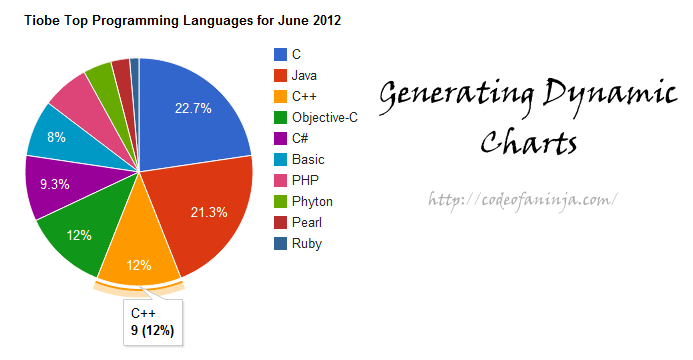
In this post, we will cover the following topics:
1.0 Dummy Database for Dynamic Pie Chart
2.0 Using LibChart to Create Dynamic Charts (PHP)
3.0 Using the Google Chart Tools (JavaScript)
2.0 Using LibChart to Create Dynamic Charts (PHP)
3.0 Using the Google Chart Tools (JavaScript)
The first way I will give you is generating a chart using PHP, and in the second way, we will use JavaScript. Here your can:
1.0 Dummy Database for Dynamic Pie Chart
This will be our example table and data.
---- Table structure for table `programming_languages`--CREATE TABLE IF NOT EXISTS `programming_languages` ( `id` int(11) NOT NULL AUTO_INCREMENT, `name` varchar(32) NOT NULL, `ratings` int(11) NOT NULL, PRIMARY KEY (`id`)) ENGINE=InnoDB DEFAULT CHARSET=latin1 AUTO_INCREMENT=11 ;---- Dumping data for table `programming_languages`--INSERT INTO `programming_languages` (`id`, `name`, `ratings`) VALUES(1, 'C', 17),(2, 'Java', 16),(3, 'C++', 9),(4, 'Objective-C', 9),(5, 'C#', 7),(6, 'Basic', 6),(7, 'PHP', 5),(8, 'Phyton', 3),(9, 'Pearl', 2),(10, 'Ruby', 1); |
2.0 Using LibChart to Create Dynamic Charts (PHP)
We will do the first way using the LibChart, the simple and free PHP chart drawing library.
Here’s a code:
<!doctype html><html><head> <title>Pie Chart Demo (LibChart)- http://codeofaninja.com/</title> <meta http-equiv="Content-Type" content="text/html; charset=ISO-8859-15" /></head><body><?php //include the library include "libchart/libchart/classes/libchart.php"; //new pie chart instance $chart = new PieChart( 500, 300 ); //data set instance $dataSet = new XYDataSet(); //actual data //get data from the database //include database connection include 'db_connect.php'; //query all records from the database $query = "select * from programming_languages"; //execute the query $result = $mysqli->query( $query ); //get number of rows returned $num_results = $result->num_rows; if( $num_results > 0){ while( $row = $result->fetch_assoc() ){ extract($row); $dataSet->addPoint(new Point("{$name} {$ratings})", $ratings)); } //finalize dataset $chart->setDataSet($dataSet); //set chart title $chart->setTitle("Tiobe Top Programming Languages for June 2012"); //render as an image and store under "generated" folder $chart->render("generated/1.png"); //pull the generated chart where it was stored echo "<img alt='Pie chart' src='generated/1.png' style='border: 1px solid gray;'/>"; }else{ echo "No programming languages found in the database."; }?></body></html> |
Some advantage of using the LibChart includes: Free, it will work even offline or if you’re just debugging on your localhost, easy to use and can be used for multiple data sets.
Some disadvantages are: It is limited to Line, Bar and Pie charts only and it works with PHP5 only.
3.0 Using the Google Chart Tools (JavaScript)
Google chart tools are powerful, simple to use, and also free.
Our index.php code:
<!DOCTYPE html PUBLIC "-//W3C//DTD XHTML 1.0 Strict//EN" "http://www.w3.org/TR/xhtml1/DTD/xhtml1-strict.dtd"> <head> <meta http-equiv="content-type" content="text/html; charset=utf-8"/> <title>Pie Chart Demo (Google VAPI) - http://codeofaninja.com/</title> </head> <body style="font-family: Arial;border: 0 none;"> <!-- where the chart will be rendered --> <div id="visualization" style="width: 600px; height: 400px;"></div> <?php //include database connection include 'db_connect.php'; //query all records from the database $query = "select * from programming_languages"; //execute the query $result = $mysqli->query( $query ); //get number of rows returned $num_results = $result->num_rows; if( $num_results > 0){ ?> <!-- load api --> <script type="text/javascript"> //load package google.load('visualization', '1', {packages: ['corechart']}); </script> <script type="text/javascript"> function drawVisualization() { // Create and populate the data table. var data = google.visualization.arrayToDataTable([ ['PL', 'Ratings'], <?php while( $row = $result->fetch_assoc() ){ extract($row); echo "['{$name}', {$ratings}],"; } ?> ]); // Create and draw the visualization. new google.visualization.PieChart(document.getElementById('visualization')). draw(data, {title:"Tiobe Top Programming Languages for June 2012"}); } google.setOnLoadCallback(drawVisualization); </script> <?php }else{ echo "No programming languages found in the database."; } ?> </body></html> |
The advantages of using Google chart tools include: Free, easy to use, multiple data sets, and haswide range of charts types that you can use, looks good and interactive.
I think the only disadvantage will be: you cannot use it when you don’t have internet connection.
How about you, do you have any other suggestions or solutions on how to create dynamic pie chart in PHP or JavaScript? Thanks for sharing it in the comments section below!
訂閱:
文章 (Atom)